
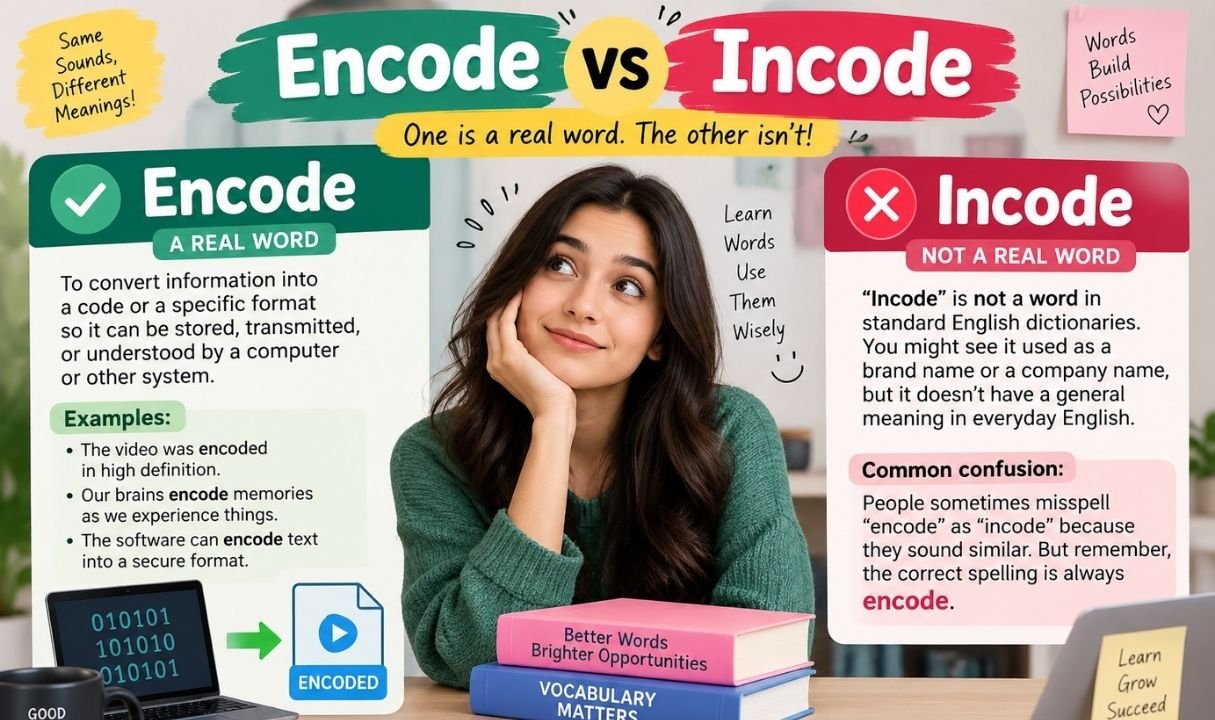
If you’ve typed “incode” into a sentence and then paused, wondering whether autocorrect is about to embarrass you, you’re not alone. The two words look almost identical, sound similar when spoken quickly, and both seem to belong somewhere near computers and codes. Only one of them actually does. This guide walks through exactly why, with real examples, grammar rules, and technical context so you never have to second-guess the spelling again.
Quick Answer (No Confusion)
Encode is the correct word. It’s a real, dictionary-recognized verb meaning to convert information into a different format — usually so a computer, device, or communication system can store, process, or transmit it.
Incode is not a standard English word. It shows up mostly as a typo, an autocorrect slip, or occasionally as a brand or company name. It has no accepted grammatical function on its own.
So whenever you’re deciding between the two for writing, coding, or conversation, encode is the safe and correct choice — every time.
What Does Encode Mean? (Clear Definition + Core Idea)
At its core, encoding is about transformation. You take information in one form and turn it into another form, usually one that’s easier to store, send, or protect. The original meaning doesn’t change — only the format it’s wrapped in does.
Encode Definition in Computer Science
In computing, to encode means to convert data — text, images, audio, or video — into a specific format that a machine can read, transmit, or store efficiently. A text file might be encoded in UTF-8. A photo might be encoded as a JPEG. A password might be encoded before it travels across a network. The underlying content stays the same; only its representation changes.
Meaning in English (Simple Explanation)
Outside of computing, encode simply means to put something into a code or system of symbols. Merriam-Webster and Oxford both define it this way, and it’s been part of standard English for decades. If you convert a message, a feeling, or a set of instructions into a form that needs to be decoded later, you’re encoding it.
What Does Encode Mean in Real Life?
Encoding isn’t limited to programmers and IT teams. It happens constantly, often without anyone noticing.
Everyday Encoding Examples
- A barcode scanner reads a product’s price by decoding information that was encoded into the black-and-white lines.
- Your brain encodes new memories by converting experiences into a form it can store and later retrieve.
- A traffic light encodes instructions — red, yellow, green — into a simple visual system drivers instantly understand.
- Sheet music encodes sound into written notation that a musician can read and reproduce.
Example Sentences
- The app will encode your files before uploading them to the cloud.
- Researchers encode survey answers as numbers to make analysis easier.
- The sound engineer had to encode the audio track in a lossless format.
- Please encode this message before you send it over the public network.
Types of Encoding (Essential Knowledge)
Not all encoding does the same job. Some formats exist purely to represent text; others compress files, secure data, or prepare content for the web.
Main Types of Encoding
Character Encoding
Character encoding maps letters, numbers, and symbols to numeric values a computer can process. Without it, a keyboard press would mean nothing to a machine.
Binary Encoding
Binary encoding represents data using only 0s and 1s — the native language of computer hardware. Every file, no matter how complex, eventually breaks down into this two-symbol system.
URL Encoding
URL encoding replaces characters that aren’t allowed in a web address (like spaces or symbols) with a percent sign followed by a code, so browsers and servers can read the link correctly.
Audio/Video Encoding
Audio and video encoding compresses raw media files into formats like MP3 or MP4, shrinking file size while keeping quality high enough for streaming and playback.
| Encoding Type | Main Purpose | Common Example |
|---|---|---|
| Character Encoding | Represent text as numbers | UTF-8, ASCII |
| Binary Encoding | Store data as 0s and 1s | Machine code |
| URL Encoding | Make web addresses readable by servers | %20 for a space |
| Audio/Video Encoding | Compress media for storage or streaming | MP3, MP4, H.264 |
What Is Incode? (Honest Reality Check)
Let’s address it directly: incode isn’t sitting in the dictionary waiting to be discovered. It’s not an obscure synonym or a regional variant. In almost every case it appears, it’s either a mistyped version of encode or the name of a company, product, or software system.
Incode Meaning
There is no accepted linguistic meaning for “incode” as a verb, noun, or adjective. If you search for it expecting a definition similar to encode, you won’t find one in any major dictionary — not Merriam-Webster, not Oxford, not Cambridge. When people use it in casual writing, they almost always mean encode.
Is Incode a Real Word?
No. Incode is not a recognized English word. It occasionally appears as a proper noun — the name of a business, an app, or a security product — but proper nouns follow different rules and don’t validate a word for general use. As a verb describing data conversion, incode simply doesn’t exist in standard English or technical writing.
Why Do People Confuse Encode vs Incode?

The confusion is understandable once you look at where it comes from.
Common Causes
- Prefix similarity: “en-” and “in-” both appear at the start of countless English words, so the brain sometimes swaps them automatically.
- Auditory overlap: Spoken quickly, “encode” and “incode” sound close enough to blur together, especially for non-native speakers.
- Brand exposure: Seeing “InCode” used as a company or product name can trick people into thinking it’s a valid everyday word.
- Typing speed: A fast typist reaching for “en” can easily land on “in” instead, and spellcheckers don’t always catch it since “incode” can pass as a name.
Encode vs Incode Difference (Side-by-Side Breakdown)
| Feature | Encode | Incode |
|---|---|---|
| Recognized in dictionaries | Yes | No |
| Grammatical function | Transitive verb | None (not a standard word) |
| Used in programming docs | Yes, constantly | No |
| Common in everyday writing | Yes | Rare, usually a typo |
| Correct spelling for data conversion | Yes | No |
| Appears as a brand/product name | Occasionally | Occasionally |
Encode vs Incode Grammar (Why Only One Works)
Grammar Role
Encode is a transitive verb, which means it needs an object to complete its meaning — you encode something. It follows regular English conjugation patterns: encode, encodes, encoded, encoding. Incode has no established grammar role because it isn’t a recognized word, so it can’t be conjugated, modified, or used as a reliable part of a sentence.
Examples
- Correct: “The system will encode the file automatically.”
- Incorrect: “The system will incode the file automatically.”
- Correct: “She encoded the password before saving it.”
- Incorrect: “She incoded the password before saving it.”
How to Use Encode Correctly in Writing
Basic Patterns
Encode almost always follows a simple subject-verb-object pattern: someone or something encodes data, a message, or a file. It can also appear in passive constructions, where the object becomes the subject and the action is described as happening to it.
Examples
- Active voice: “The developer encodes the video before uploading.”
- Passive voice: “The video is encoded before it’s uploaded.”
- Past tense: “We encoded the entire database last night.”
- Present continuous: “The server is encoding the new files right now.”
Can You Use Incode in Any Context?
Incorrect Usage
“Please incode this document before sending it” — this sentence looks technical but is grammatically unsupported. There’s no standard rule, dictionary entry, or style guide that accepts “incode” as a verb here.
Correct Version
“Please encode this document before sending it.” Swapping in the correct word fixes the sentence instantly, with no change to meaning or structure needed elsewhere.
Encoding in Programming (Deep Explanation)
Why Encoding Is Necessary
Computers don’t naturally understand letters, images, or sound — they only process numbers represented in binary. Encoding bridges that gap. Without it, a word processor couldn’t display text, a browser couldn’t render a webpage, and a video app couldn’t play a single frame. Encoding also matters for compatibility: a file encoded one way on one system needs to be interpreted correctly on another, which is why standardized formats exist in the first place.
Encoding additionally plays a role in reducing file size, protecting data from corruption during transfer, and making sure special characters — accented letters, emojis, punctuation from different languages — display correctly across devices.
Data Encoding Techniques (Technical Detail)
Common Methods
Binary Encoding
Binary encoding turns any type of data into strings of 0s and 1s, the format computer processors are built to read directly.
Base64 Encoding
Base64 encoding converts binary data into plain text characters, which is useful when a system — like an email attachment or a web API — only accepts text and can’t handle raw binary safely.
UTF-8 Encoding
UTF-8 is the most widely used character encoding on the internet. It represents nearly every character from every written language using a flexible number of bytes, which is why it has become the default standard for websites and applications.
Character Encoding Examples
- ASCII assigns a number to each English letter, digit, and basic symbol.
- UTF-8 extends that idea to cover global languages, emojis, and special characters.
- Unicode acts as the master reference that formats like UTF-8 are built on, giving every character a unique identifier regardless of platform or language.
Binary Encoding Explained Simply
Think of binary encoding as a light switch system. Each switch is either on or off — a 1 or a 0. String enough switches together in the right pattern, and you can represent a letter, a color, a sound, or an entire movie. It’s not glamorous, but it’s the foundation every other encoding method eventually relies on.
Encode vs Encrypt vs Decode (Important Distinction)
These three terms get mixed up often, but they serve very different purposes.
Clear Comparison
| Term | What It Does | Reversible By Anyone? |
|---|---|---|
| Encode | Converts data into a different, readable format | Yes, with the right decoder |
| Encrypt | Scrambles data to keep it secret and secure | Only with a specific key |
| Decode | Converts encoded data back to its original form | N/A — this is the reversal step |
Encoding is about compatibility and structure, not secrecy. Anyone with the right tool can decode encoded data. Encryption, on the other hand, is designed specifically to keep information hidden from anyone who doesn’t have the correct key.
Text Encoding vs Encryption
Encoding
Encoding changes the format of text so systems can read, store, or transmit it properly. It’s not meant to hide anything — a standard decoder can reverse it instantly.
Encryption
Encryption transforms text specifically to protect it from unauthorized access. Reversing it requires a password, key, or algorithm that only authorized parties possess.
Impact of the Mistake
Scenario
Imagine a developer writes internal documentation and repeatedly uses “incode” instead of “encode” when describing how the company’s app processes user data.
What Happens
New team members reading the documentation get confused, since “incode” doesn’t match anything in official programming references, tutorials, or language documentation they’ve studied. Some assume it’s a typo; others waste time searching for a function or method that doesn’t exist.
Correct Version
Replacing every instance of “incode” with “encode” instantly aligns the documentation with standard technical language used across the industry.
Result
Clarity improves, onboarding gets faster, and the documentation matches what developers expect to see when they search official references or ask other engineers for help.
Common Mistakes to Avoid
Using “incode” Instead of Encode
This is the single most common error, usually rooted in typing speed or unfamiliarity with the correct spelling.
Confusing Encode with Encrypt
Encoding organizes and formats data; encryption protects it. Using them interchangeably can create real security misunderstandings in technical writing.
Ignoring Context
Encode vs incode example: writing “the app will incode your photo” instead of “the app will encode your photo” changes nothing about meaning but immediately signals an error to any reader familiar with the terminology.
Encode in computer contexts always refers to converting data — text, image, audio, or video — into a machine-readable or storage-ready format, never to “incode,” which has no equivalent technical definition.
Why Encode Is the Correct Word
Encode has centuries of linguistic history behind it, built from the prefix “en-” (meaning “to put into”) plus “code.” It’s documented in every major dictionary, used consistently across programming languages, style guides, and technical documentation, and understood the same way by English speakers worldwide. Incode has none of that backing — no dictionary entry, no established grammar, no consistent usage pattern beyond typos and brand names.
Context Matters: Where Encode Is Used
Computer Science
Programmers encode data structures, files, and strings constantly, whether they’re saving a document, compressing a video, or preparing data for a database.
Web Development
Developers encode URLs, form data, and special characters so browsers and servers can exchange information without errors or broken links.
Digital Communication
Messaging apps, email clients, and streaming platforms encode text, audio, and video behind the scenes every time you send a message or watch a video, even if you never see the process happening.
Encoding Examples in Real Life
- Streaming services encode video files into multiple resolutions so viewers with different internet speeds can watch smoothly.
- Payment systems encode card details into formats required for secure processing between banks and merchants.
- GPS devices encode location data into coordinates that mapping software can interpret and display.
- Voice assistants encode spoken language into text data before analyzing what you asked.
Quick Practice (Lock It In)
Fill in the Blank
- The website will _______ the form data before submitting it. (encode)
- Developers often _______ text using UTF-8 for compatibility. (encode)
- This file needs to be _______ before it can be uploaded. (encoded)
Fix the Sentence
- Wrong: “We need to incode this message before sending it.”
- Right: “We need to encode this message before sending it.”
- Wrong: “The system incodes user passwords automatically.”
- Right: “The system encodes user passwords automatically.”
Key Takeaways (Simple and Clear)
- Encode is the correct, dictionary-recognized word for converting data into another format.
- Incode is not standard English — it’s almost always a typo or a brand name.
- Encoding is about format and compatibility, not secrecy; encryption handles security.
- Common encoding types include character, binary, URL, and audio/video encoding.
- When in doubt while writing or coding, encode is always the safe choice.
Getting this right isn’t complicated once the difference is clear. Encode belongs in your documentation, your code comments, and your everyday writing. Incode doesn’t — keep it out, and your writing will read as accurate and professional every time the topic of data conversion comes up.
Frequently Asked Questions
Is it encode or incode?
It’s encode. Incode is not a standard English word and has no accepted meaning related to data conversion.
What does “incode” mean?
It has no recognized dictionary meaning. It’s typically a misspelling of encode or the name of a specific brand or product.
What do you mean by encode?
To encode means to convert information — text, audio, video, or data — into a different format for storage, transmission, or processing.
What is the difference between code and encode?
Code refers to a system of symbols or instructions itself, while encode is the action of converting information into that coded system.